About OpenWire

OpenWire is a free open source library. The library allows writing advanced VCL and
FireMonkey components for rapid codeless application development. The components developed with the library allow creation of complex applications with zero lines of program code.
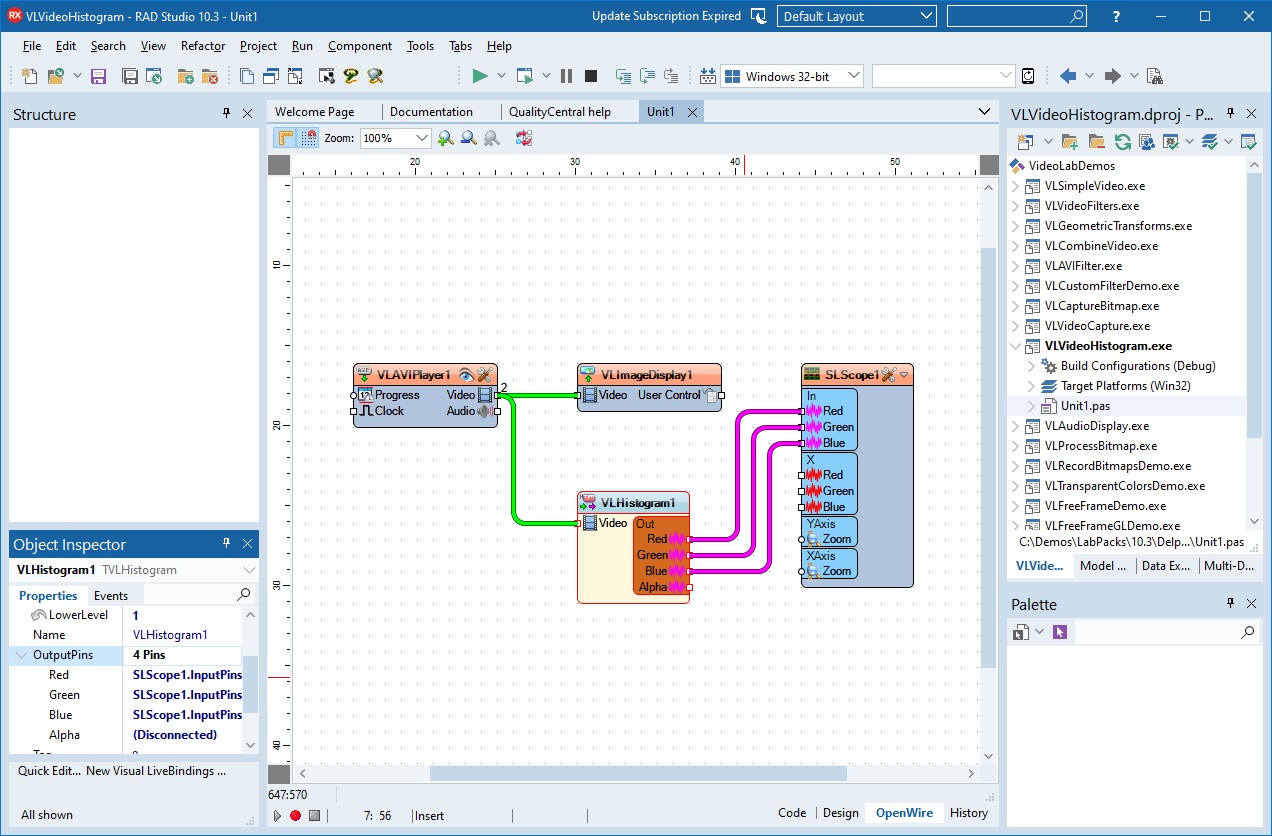
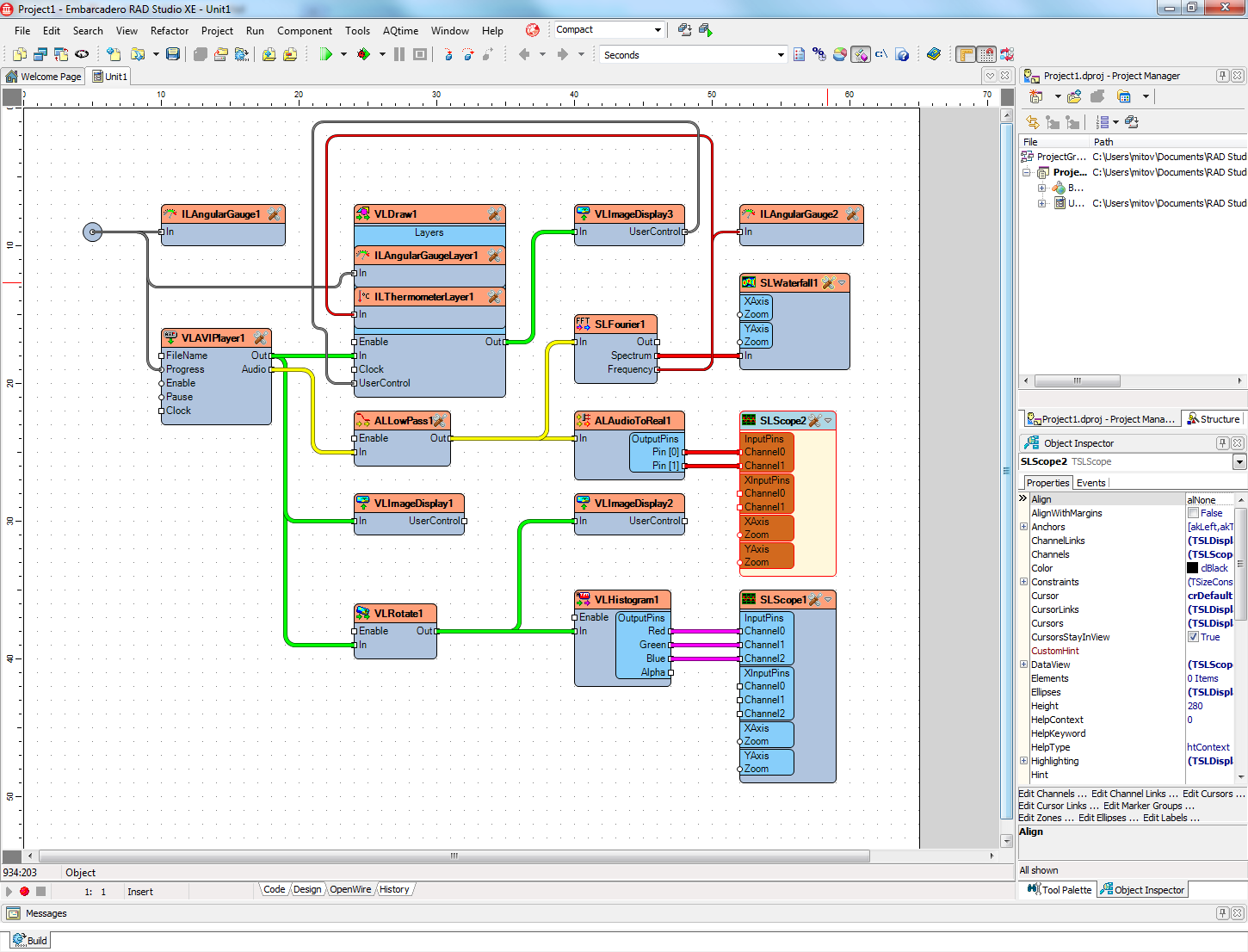
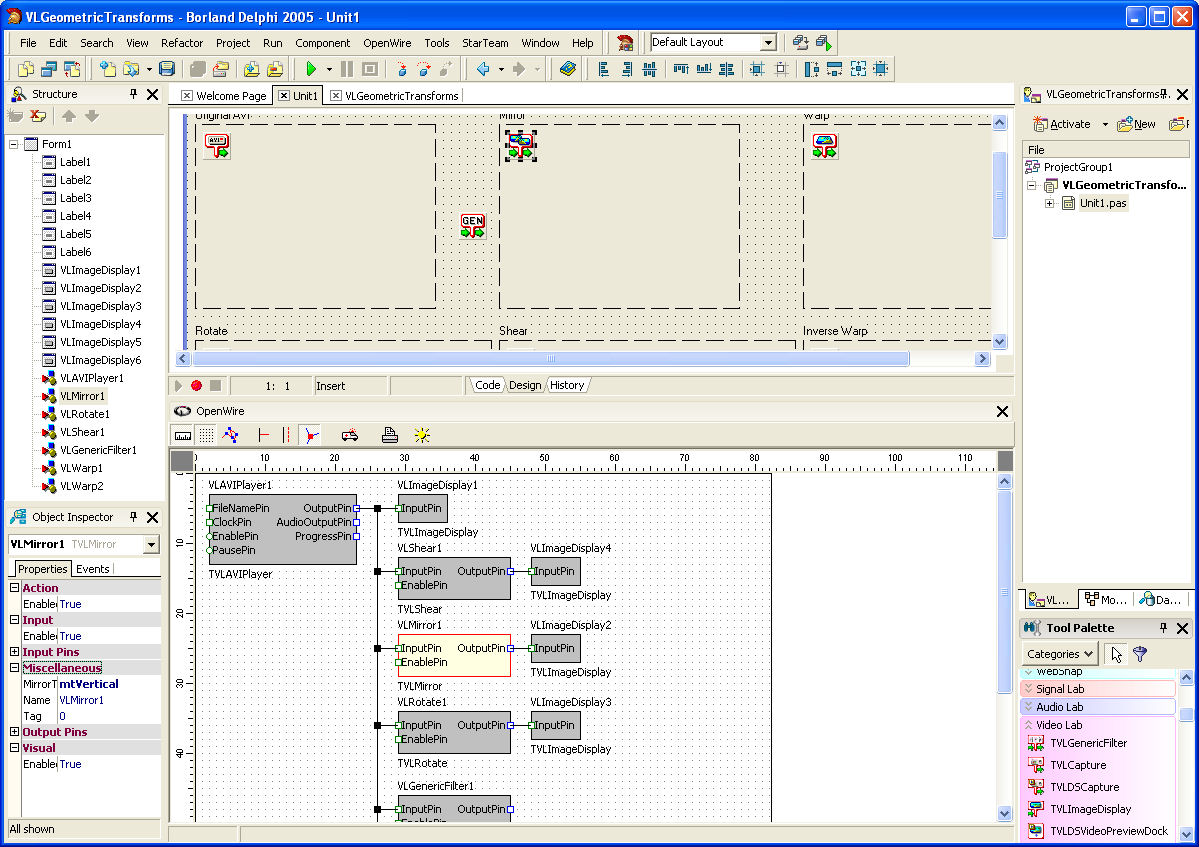
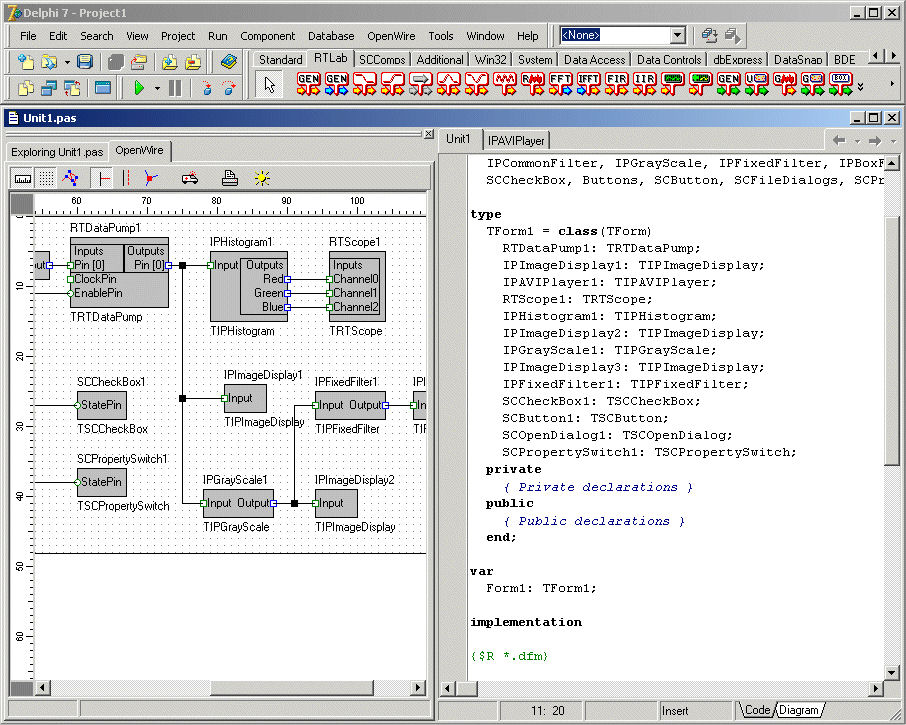
The above image visualizes OpenWire properties. The application shown is a fully functional audio-video processing application with user interface and file selection dialog, written with zero lines of code. The the AVIPlayer and the audio-to-real converter as well as the scope and image displays -- everything communicates over OpenWire connections that you chain together at design time. There is no code whatsoever involved in implementing the application!
Donate to the OpenWire project
OpenWire is free open source project. The product is result of many years of development. If you like the technology, and are willing to help us continue working on it, you can donate using the link bellow:
OpenWire on SourceForge.net
Please let us know if you are interested in contributing to the project development so we can consider adding you to the list of project members.
Our component libraries come in 3 versions a VCL - Firemonkey version (for Delphi / C++ Builder / RAD Studio 10.3 or higher), an MFC compatible Visual C++ version, and a .NET 4.0 supporting Visual Studio 2005 or higher.
The RAD Studio version is a set of native VCL and Firemonkey components of which all include now the powerful Mitov Runtime.
The Visual C++ version is a set of native Visual C++ classes (components).
The NET 4.0 (4.5 and higher compatible) version is a set of managed .NET components. The .NET version has the same performance as the native versions, and supports all the Microsoft .NET languages including Visual Basic, C#, J#, F# and C++/CLI.
Due to the unique architecture of the OpenWire platform, the components are implemented the same way in Managed .NET and native Windows (32 and 64 bit) environments. The code to control a component from VB.NET, C++/CLI, C#, and J#, Visual C++ MFC, Delphi, and C++ Builder is almost identical. This allows the developers to migrate and share code between the different environments thus significantly improving the productivity.
OpenWire Libraries: for fast, complex data stream processing with almost zero lines of code!
OpenWire itself is FREE Open Source project. Below is a brief description of some of the features of the current OpenWire version. The full documentation is available as a Word document.
The purpose of the OpenWire project is to introduce a unified, easy way to transfer data among different VCL or
FireMonkey components.
This is very similar to the way that products like LabView and HP VEE work. For example, you could quickly build an application with a sine wave generator,
which streams out to a chart
and in parallel to a filter,
which streams out to another chart
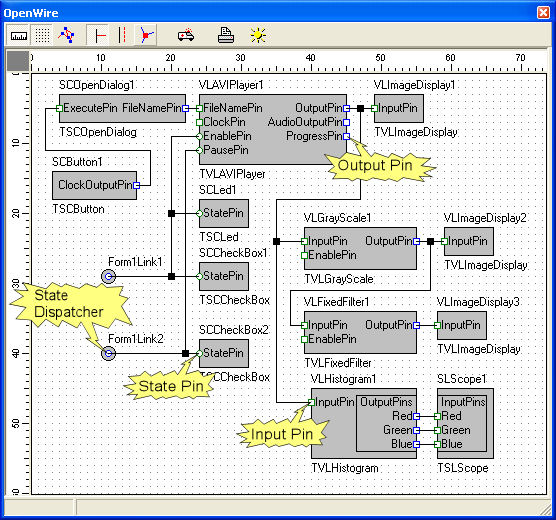
and in parallel to a file logger, as well as to a serial communication sending the data to another system. And what makes this easy is that you do not write code: You build streams by connecting an OutputPin to one or more InputPins. The underlying technology pumps your data from pin to pin, using multiple threads for high performance.
OutputPins and InputPins can be viewed as connectors on the edges of components -- and Mitov Software offers a vast array of custom components on multiple platforms; or, you can build your own.
Features of OpenWire Componets:
-
Each component can have one or more inputs and/or outputs.
-
Each Input or Output is called Pin. I.E. there are IputPins and OutputPins.
-
Each OutputPin can stream specific format data to compatible format InputPins.
-
Each type of data has its own data specification.
The data specification is a globally unique data type identifier. For example, the integer data type has one type of data specification and the String data type has a different one. An OutputPin can be specified as being able to stream one or many types of data. For example, you could have an OutputPin that sends file names and streams String data. Any InputPin accepting Strings will be able to connect and receive from this Pin, and any Pin accepting file names will be able to connect and receive, too. Specifically:
-
Each Pin is a property cloned from TOWPin.
-
The InputPin is inherited from TOWPin and the are called TOWSinkPin.
-
The OutputPin is inherited from TOWPin and the are called TOWSourcePin.
-
The InputPin and OutputPin are responsible for implementing one or many stream specific inerface(s). The interface has a unique GUID specified for that type of stream.
-
The InputPin and OutputPin have data specification which describes what type of data types (interfaces) it can accept (connect to).
-
The data specification for a certain data type contains in the TPinType object.
-
The TPinType contains one or more entries of type TGUID.
-
The TGUID is used to determine the type of data - it’s in fact the GUID of the interface being able to connect to that type of data.
There is a handshaking mechanism involved during the connection of 2 Pins. Only compatible data type Pins can be connected. Otherwise the connection is rejected. There are property editors which are allowing you to connect the Pins. You can connect 2 Pins at run time as well.
OpenWire 2.x adds StatePins. StatePins can be connected together by creating hidden objects named StateDispatchers(States). The StatePins share one and the same state. If a the state of one of the StatePins changes all the connected StatePins are changing to the same state. StatePins can be connected to one SourcePin, and/or to multiple SinkPins.
The following products are developed with OpenWire and are free for non commercial purposes:
OpenWire: Frequently Asked Questions
Q: Can I use OpenWire in a non open source commercial application or component library?
A:
Yes you can use OpenWire in non open source applications and component libraries.
Q: Can I write multithreading applications using OpenWire? Is it multithreading safe?
A:
Yes. The latest version of OpenWire is fully multithread safe, and is used in heavily multithreaded solutions.
Q: Why do I see only few simple components when I install OpenWire? Where are the OpenWire components?
A:
OpenWire is a library of properties called Pins. It does not provide components, just properties for writing such components. The components you see are demo components provided to you to learn how to use OpenWire in your components.
OpenWire Installers
Firemonkey and VCL Installer:
OpenWire 8.0.0.156 VCL and FireMonkey for 13.X Florence
Updated on 2025-10-27, downloaded 68 times.
Firemonkey and VCL Installer:
OpenWire 8.0.0.147 VCL and FireMonkey for 12.3 Athens
Updated on 2025-05-24, downloaded 323 times.
Firemonkey and VCL Installer:
OpenWire 8.0.0.77 VCL and FireMonkey 32 & 64 bit support for 11.X Alexandria
Updated on 2022-05-01, downloaded 514 times.
Firemonkey and VCL Installer:
OpenWire 8.0.0.74 VCL and FireMonkey 32 & 64 bit support for 10.4 Sydney Update 2
Updated on 2022-04-25, downloaded 261 times.
Firemonkey and VCL Installer:
OpenWire 8.0.0.73 VCL and FireMonkey 32 & 64 bit support for 10.3 Rio Update 3
Updated on 2022-04-20, downloaded 288 times.
Legacy Firemonkey and VCL Installer:
OpenWire 7.8.2.288 VCL and FireMonkey 32 & 64 bit support for 10.2 Tokyo and 10.3 Rio
Updated on 2018-12-21, downloaded 858 times.
Legacy Firemonkey and VCL Installer:
OpenWire 7.8.2.0 VCL and FireMonkey 32 & 64 bit support for XE8 to 10.1 Berlin
Updated on 2016-06-06, downloaded 2013 times.
Legacy Firemonkey and VCL Installer:
OpenWire 7.7.0.0 VCL and FireMonkey 32 & 64 bit support for XE7 to 10 Seattle
Updated on 2015-10-28, downloaded 851 times.
Legacy Firemonkey and VCL Installer:
OpenWire 7.6.1.0 VCL and FireMonkey 32 & 64 bit support for XE6 to XE8
Updated on 2015-06-11, downloaded 759 times.
Legacy Firemonkey and VCL Installer:
OpenWire 7.5.0.0 VCL and FireMonkey 32 & 64 bit support for XE4 to XE7
Updated on 2014-11-19, downloaded 954 times.
Legacy Firemonkey and VCL Installer:
OpenWire 7.0.0.0 VCL and FireMonkey 32 & 64 bit support for XE3 to XE6
Updated on 2014-04-22, downloaded 918 times.
Legacy Firemonkey and VCL Installer:
OpenWire 6.0.0 VCL and FireMonkey (Windows only) 32 and 64 bit support for XE2 to XE4
Updated on 2013-06-15, downloaded 1311 times.
Legacy Firemonkey and VCL Installer:
Legacy OpenWire 5.0.3 VCL and FireMonkey (Windows only) 32 and 64 bit support for 2010 to XE
Updated on 2012-10-10, downloaded 2308 times.
Legacy Firemonkey and VCL Installer:
OpenWire 5.0.1 for Delphi/C++ Builder 5 to 2009
Updated on 2011-10-18, downloaded 23169 times.
Demos
This software is provided 'as-is', without any express or
implied warranty. In no event will the author be held liable
for any damages arising from the use of this software.
Permission is granted to anyone to use this software for any
purpose, including commercial applications, and to alter it
and redistribute it freely, subject to the following
restrictions:
1. The origin of this software must not be misrepresented,
you must not claim that you wrote the original software.
If you use this software in a product, an acknowledgment
in the product documentation would be appreciated but is
not required.
2. Altered source versions must be plainly marked as such, and
must not be misrepresented as being the original software.
3. This notice may not be removed or altered from any source
distribution.