A Delphi-friendly way to simplify GDI+ functionality!


  • Resource auto-release
  • Call chaining
  • Delphi Events as callbacks
  • Simplified error handling
  • Functions new to GDI+
  • Use TCanvas, TBitmap, TIcon


About IGDI+

The free open source library allows quick and easy implementations of complex GDI+ applications, in a natural Delphi-friendly code.


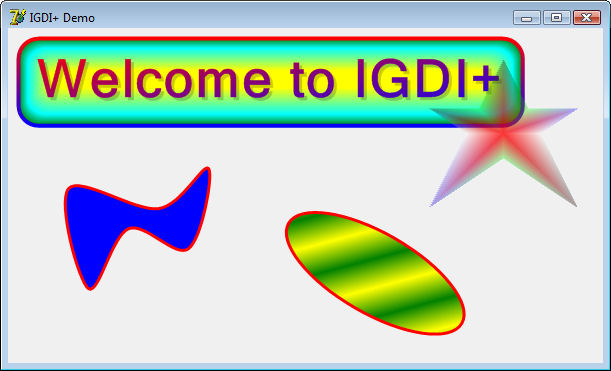
For example, to make this:


/system/shots/43/original/IGDIPlusDemo.jpg?1311195121


... you write code like this:
 
procedure TForm1.FormPaint(Sender: TObject);
var
 AGraphics      : IGPGraphics;
 AFont          : IGPFont;
 ALeftTopCorner : TGPPointF;
 ARect          : TGPRectF;
 ARect1         : TGPRectF;
 APath          : IGPGraphicsPath;

begin
 AGraphics := TGPGraphics.Create( Canvas );
 AGraphics.SmoothingMode := SmoothingModeAntiAlias;
 AGraphics.TextRenderingHint := TextRenderingHintAntiAlias;
 
 ALeftTopCorner := MakePointF( 20, 20 );
 AFont := TGPFont.Create( 'Microsoft Sans Serif', 40, [ fsBold ] );
 ARect := AGraphics.GetStringBoundingBoxF( 'Welcome to IGDI+', AFont, ALeftTopCorner );
 ARect1 := GPInflateRectF( ARect, 10, 10 );

 // Draw a fancy rounded rectangle.
 AGraphics.DrawRoundRectangleF(
       TGPPen.Create( TGPLinearGradientBrush.Create( GPInflateRectF( ARect1, 2, 2 ), aclRed, aclBlue, LinearGradientModeVertical ), 4 ),
       TGPPathGradientBrush.Create(
         TGPGraphicsPath.Create().AddRoundRectangleF( ARect1, MakeSizeF( 20, 20 ) )
          )
        .SetInterpolationColorsArrays( [ aclGreen, aclCyan, aclYellow ], [ 0, 0.3, 1 ] )
        .SetCenterPointF( MakePointF( 250, 50 ))
        .SetFocusScales( 0.87, 0.2 ),
       ARect1, MakeSizeF( 20, 20 ) );

 // Draw a text with semitransparent shadow.
 AGraphics.DrawString( 'Welcome to IGDI+',
            AFont,
            MakePointF( 23, 23 ),
            TGPSolidBrush.Create( MakeARGBColor( 50, aclBlack )) )
            
      .DrawString( 'Welcome to IGDI+',
            AFont,
            ALeftTopCorner,
            TGPLinearGradientBrush.Create( ARect, aclRed, aclBlue, LinearGradientModeForwardDiagonal ));


 // Draw a closed curve.
 AGraphics.DrawClosedCurveF( TGPPen.Create( aclRed, 3 ), TGPSolidBrush.Create( aclBlue ),
       [
       MakePointF( 60, 160 ),
       MakePointF( 150, 180 ),
       MakePointF( 200, 140 ),
       MakePointF( 180, 220 ),
       MakePointF( 120, 200 ),
       MakePointF( 80, 260 )
       ] );

 // Draw a semitransparent star.
 APath := TGPGraphicsPath.Create();
 APath.AddLinesF(
  [
  MakePointF( 75, 0 ),
  MakePointF( 100, 50 ),
  MakePointF( 150, 50 ),
  MakePointF( 112, 75 ),
  MakePointF( 150, 150 ),
  MakePointF( 75, 100 ),
  MakePointF( 0, 150 ),
  MakePointF( 37, 75 ),
  MakePointF( 0, 50 ),
  MakePointF( 50, 50 )
   ] );

 AGraphics.TranslateTransform( 420, 30 )
      .FillPath(
       TGPPathGradientBrush.Create( APath )
        .SetCenterColor( MakeColor( 200, 255, 0, 0))
        .SetSurroundColors(
         [
         MakeColor(80, 0, 0, 0),
         MakeColor(80, 0, 255, 0),
         MakeColor(80, 0, 0, 255),
         MakeColor(80, 255, 255, 255),
         MakeColor(80, 0, 0, 0),
         MakeColor(80, 0, 255, 0),
         MakeColor(80, 0, 0, 255),
         MakeColor(80, 255, 255, 255),
         MakeColor(80, 0, 0, 0),
         MakeColor(80, 0, 255, 0)
         ] ),

       APath );

 // Draw rotated ellipse.
 AGraphics.ResetTransform()
      .TranslateTransform( 300, 160 )
      .RotateTransform( 30 )
      .DrawEllipseF(
       TGPPen.Create( aclRed, 3 ),
       TGPLinearGradientBrush.Create( MakePointF( 0, 0 ), MakePointF( 20, 20 ), aclYellow, aclGreen )
       .SetWrapMode( WrapModeTileFlipX ),
       0, 0, 200, 80 );
end;


Donate to the IGDI+ project
 
If you like the technology, and are willing to help us continue working on it, you can donate using the link bellow: 


IGDI+ on SourceFourge.net
 
IGDI+ is now available on SourceForge: https://sourceforge.net/projects/igdiplus/ . An SVN repository is used. We are in process of adding all the source files.
 
You can access the SVN repository here: https://igdiplus.svn.sourceforge.net/svnroot/igdiplus directly or by using SVN :
 
svn co https://igdiplus.svn.sourceforge.net/svnroot/igdiplus igdiplus
 
Please let us know if you are interested in contributing to the project development so we can consider adding you to the list of project members.


Delphi 2010 C++ Builder 2010 RAD Studio 2010 Delphi Prism


Here are some of the specifics:
 
  • All GDI+ objects are accessed trough interfaces, with automatic release of resources.
  • All data types are either Delphi objects, records or arrays.
  • Most class member functions return pointer to the class allowing the next function to be called in the same line, thus simplifying the code.
  • All callbacks are wrapped into events.
  • The library directly integrates with TCanvas, TBitmap, and TIcon.
  • Whenever classes have similar functionality they expose common interface for code reusability.
  • All errors are handled trough exceptions for simplified error handling, and code reduction.
  • The library also adds a number of functions missing in GDI+ such as rounded rectangles, and combined Pen and Brush drawing functions.
  • All functions using pointers in C++ are redesigned to accept or return Delphi arrays.
  • Here is example of relatively complex IGDI+ rendering with the corresponding source code. As it is obvious most of the shapes are rendered with a single expression.


IGDI+: What's New

New in Version 5.0.2 (released on 2012-04-16)


  • Added 64 bit support.
  • Improved FireMonkey compatibility.
  • Added the option to include the unit using a different name to allow multiple instances to be loaded in packages.

New in Version 5.0 (released on 2011-09-12)

  • Added Delphi XE and XE2 support.
  • Added FireMonkey compatibility.
  • Some small changes and few new functions added in the IGPGraphics.
  • Added the option to easily save and restore the transformations.

New in Version 2.2

  • Minor improvements.

New in Version 2.1

  • Minor improvements.

New in Version 2.0

  • Added Delphi 2010 support.
  • Number of small improvements.

New in Version 1.0

  • This is the first official IGDI+ release.
( Click to view Larger images. )
These demos are executable after downloading.
Also see:   Demo source code downloads

IGDI+ Examples

IGDI+ Example IGDI+ Example

IGDI+: Frequently Asked Questions

Q: Can I use IGDI+ in a non open source commercial application or component library?
A:
Yes you can use IGDI+ in non open source applications and component libraries.

IGDI+ Installers

VCL Installer: IGDI+ for Delphi and C++Builder
Updated on 2012-04-16, downloaded 4610 times.

Demos

These demos are executable after downloading.   Also see: Demo source code downloads


             This software is provided 'as-is', without any express or
             implied warranty.  In no event will the author be held liable
             for any  damages arising from the use of this software.
 
             Permission is granted to anyone to use this software for any
             purpose, including commercial applications, and to alter it
             and redistribute it freely, subject to the following
             restrictions:
 
             1. The origin of this software must not be misrepresented,
                you must not claim that you wrote the original software.
                If you use this software in a product, an acknowledgment
                in the product documentation would be appreciated but is
                not required.
 
             2. Altered source versions must be plainly marked as such, and
                must not be misrepresented as being the original software.
 
             3. This notice may not be removed or altered from any source
                distribution.

News

April 16, 2012more...

New .NET and XE2 Releases: version 5.0.2 with 64-bit support

March 23, 2012more...

64-bit .NET support! Beta prerelease with many improvements

March 14, 2012more...

The NEW OpenWire Live Bindings 5.0.1 beta is released!

March 10, 2012more...

32/64-bit XE2 Update 4 release!

October 26, 2011more...

The NEW OpenWire Editor version 5.0.1 beta is officially released

October 18, 2011more...

Release of version 5.0.1 of the libraries on all platforms

October 12, 2011more...

And don't miss my second talk: Video, Audio Processing, DSP, Artificial Intelligence and Computer Vision with FireMonkey

October 11, 2011more...

Don't miss my speech at CodeRage 6: Creating dual-compile controls for VCL and FireMonkey

September 2, 2011more...

Welcome to our New Web Site!

Partners

Em

Published

Torry_logo